


Turn related findings into one comment
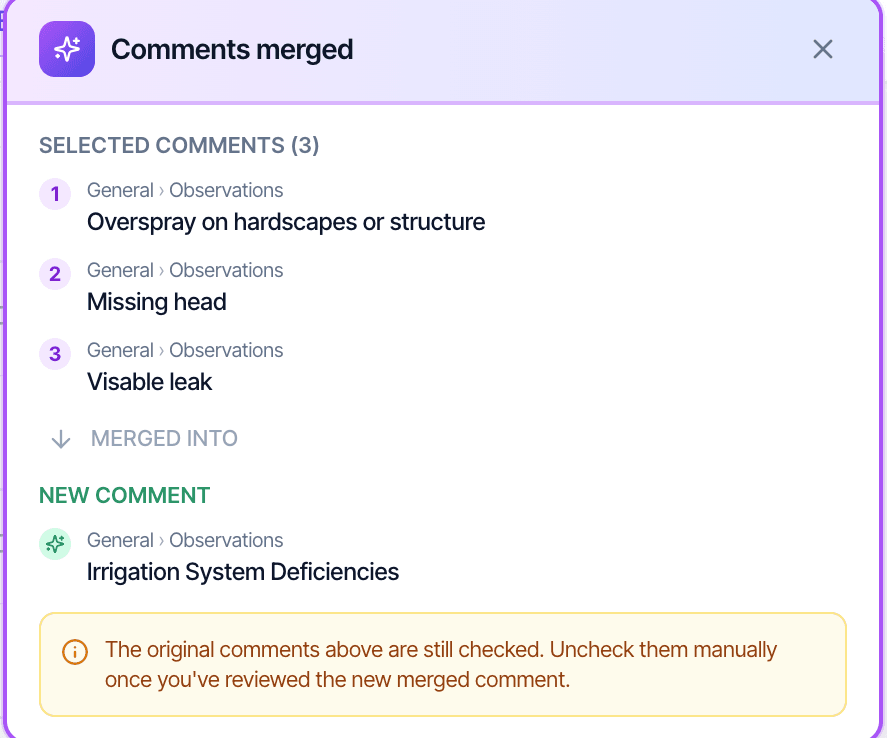
With AI Comment Merge, three sprinkler findings become one irrigation comment. Every photo and location tag comes with it.
- Up to 3
- comments in one merge
- Every photo
- and location tag carried over
- Every plan
- included, with no usage cap
A shorter report your client can get through
Less alarming to read
Related findings grouped into one comment make the report shorter and easier for your client to read.
Nothing is dropped
The photos, location tags and descriptions from every comment you merge move into the new one. Hive writes a title that covers them all.
You decide what goes
The original comments stay checked until you uncheck them. Read the merged comment first, then clear the originals.
How AI Comment Merge works
It runs from the defect summary, on the web and in the mobile app. Setup steps in the Hive docs
Step 1
Open the defect summary
Every defect on the report in one list, where repeated findings are easy to spot.
Step 2
Pick up to three and merge
Hive writes one comment with a new title and gathers the photos and location tags into it.
Step 3
Read it, uncheck the originals, save
The merged comment takes the place of the ones you combined.
AI Comment Merge questions
What is AI Comment Merge?
Does merging delete the original comments?
Does AI Comment Merge work on the mobile app?
Does AI Comment Merge cost extra?
How the AI fits together is on the AI home inspection software page. Anything else: email support@hiveinspect.com.
Merge related findings on your next report
Start with 5 free reports, no credit card. We move your templates, agreements, services, contacts and settings, and set up your account so it’s ready to run your business, free.