Hive
AI-powered inspection reports now available
Join Inspectors Community
See FeaturesTry It Free
Hive
  • Sample Reports
  • Features

    Product

    • Features

      Explore all features and capabilities

    • AI Home Inspection Software

      How AI reporting works, and how to judge it

    • Best Home Inspection Software

      A buying guide for comparing Hive, Spectora and HomeGauge

    • Report Software

      What to require from home inspection report software

    AI features

    • AI Comment Assist

      Write a full inspection comment from a few words

    • AI Comment Merge

      Combine related findings into one clean comment

    • Context Layer

      Market context on every defect in the report

    • AI Smart Add

      Coming soon

    • AI Repair Cost Estimator

      Coming soon

    Compare with

    • All comparisons
    • Hive Inspect vs Spectora
    • Hive Inspect vs HomeGauge
    • Hive Inspect vs Binsr
    • Hive Inspect vs ScribeWare
    • Hive Inspect vs ISN
    • Hive Inspect vs Inspector Toolbelt
    • Hive Inspect vs Palmtech
    • Hive Inspect vs Tap Inspect
    • Hive Inspect vs Horizon
  • Who We Serve
  • Pricing
  • Websites
  • Resources
    • Best Software Guide

      Compare Hive Inspect, Spectora and HomeGauge

    • Report Software Guide

      What to require from report-writing software

    • Free Checklists

      Printable field checklists for inspectors

    • Migrating From Horizon

      A step-by-step switching guide

    • FAQ

      Common questions answered

    • Privacy Pledge

      How we protect your data

Inspector Login
Get Started Free

Menu

  • Sample Reports
  • Features
  • Best Home Inspection Software
  • Home Inspection Report Software
    • AI Comment Assist
    • AI Comment Merge
    • Context Layer
    • AI Smart Add (coming soon)
    • AI Repair Cost Estimator (coming soon)
  • AI Home Inspection Software
    • All comparisons
    • Hive Inspect vs Spectora
    • Hive Inspect vs HomeGauge
    • Hive Inspect vs Binsr
    • Hive Inspect vs ScribeWare
    • Hive Inspect vs ISN
    • Hive Inspect vs Inspector Toolbelt
    • Hive Inspect vs Palmtech
    • Hive Inspect vs Tap Inspect
    • Hive Inspect vs Horizon
  • Who We Serve
  • Pricing
  • Websites
  • Free Checklists
  • Migrating From Horizon
  • FAQ
  • Docs & Help Center
  • Data Privacy Pledge
Get Started FreeInspector Log in
Features/Context Layer
Available now

Context Layer

Clients cannot tell a routine finding from a serious one. Context Layer answers that inside the report, on every defect, with nothing extra for you to type.

Start free
See all features

What is the Context Layer?

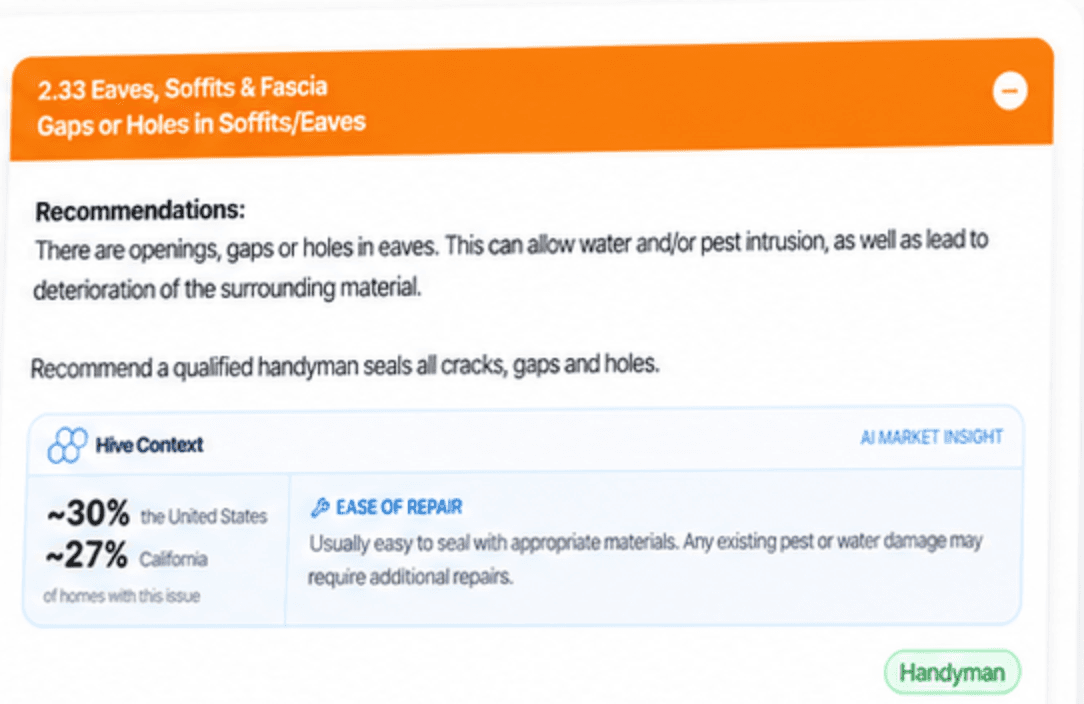
The Context Layer is a feature in Hive, the AI home inspection software, that adds market context to each defect in an inspection report. Next to the finding, the client sees roughly what share of homes have the same issue nationally and in that state, plus a short read on how involved the repair usually is. It appears in a separate box labelled Hive Context and marked as an AI Market Insight, so it is clearly Hive analysis rather than the inspector's own observation.

What it does
Adds market context to each defect in the report
What it shows
Share of homes with the issue nationally and in the state, plus ease of repair
How it is labelled
A separate Hive Context box, marked AI Market Insight
Generated
On publish, or when you generate a PDF beforehand
Availability
On request, for members on a recurring subscription
Can be switched off
Per report, from the three dot menu, then publish again
An inspection report defect about gaps in soffits, with a Hive Context box marked AI Market Insight showing roughly 30 percent of homes in the United States and 27 percent in California have the issue, plus an ease of repair note
The Hive Context box as a client sees it: the share of homes with the same issue nationally and in the state, and what the repair usually involves.

What it adds to every defect

  • How often the issue turns up in homes across the United States or Canada
  • How often it turns up in the state the property is in, so the number means something locally
  • A two line read on how involved the repair usually is
  • A separate box, labelled Hive Context and marked AI Market Insight
  • All of it inline with the finding, where the client is already reading

How the Context Layer works

You ask for it once. After that it runs on its own, and you can pull it from any single report.

01

Ask us to switch it on

Context Layer is turned on by request, for subscribers on a recurring plan. Message us on the chat bubble with the templates you want it running on and we enable it for your account.

02

Inspect the way you already do

Nothing changes on site. You do not write the context, tag anything for it or answer extra questions. Your findings are your findings.

03

The context is generated with the report

Hive produces it when you publish the report, or when you generate a PDF ahead of publishing. Either works from the web editor or the mobile app.

04

Pull it from a report whenever you want

If a client would rather read the report without it, open the report in the web editor, use the three dot menu to switch Context Layer off, and publish again.

Why inspectors turn it on

Reports stop reading as alarmist

Some red defects, like a missing smoke detector, frighten clients even though they are not deal-killers. With the context in place your reports do not read as alarmist, which matters most for first-time buyers.

Fewer calls after delivery

Context Layer is expected to reduce the follow-up calls you get after releasing a report.

Expectations set before the contractor

The ease of repair line gives clients a sense of the work involved before they start ringing around for quotes.

Worth knowing

Enabled on request

It is not a switch in settings. Ask us on chat, name the templates, and we enable it for your account. Recurring subscription only.

The data is ours

The numbers come from a proprietary AI model Hive developed in house, and we keep improving it.

The format is fixed for now

The box looks the same on every report. More configuration may follow once we have heard what inspectors want from it.

Labelled so nobody confuses it with your findings

It sits in its own Hive Context box, marked as an AI Market Insight, so a client can see it comes from Hive rather than from your inspection. Look it over on your own reports before you ask us to turn it on.

Context Layer questions, answered

It tells them how common each finding actually is. Some red defects, such as a missing smoke detector, really scare clients even though they are not deal-killers. With that context in place your reports do not read as alarmist, which matters especially for first-time buyers, and it is expected to reduce the follow-up calls you get after releasing a report.
From a proprietary AI model Hive developed in house, which we are constantly improving.
Not currently. The format is finalized as-is. We may add more configuration options down the line based on feedback.
When you publish the report, or when you generate a PDF before publishing. Both work from the web report editor and from the mobile app.
Yes. Open the report in the web report editor, use the three dot menu to switch Context Layer off, and publish again. The client gets the report without it.
The context sits in its own box, labelled Hive Context and marked as an AI Market Insight, so it reads as Hive analysis and not as part of your inspection findings. We still recommend reading it on your own reports and satisfying yourself before asking us to enable it.
Message us on the chat bubble in Hive with the templates you want it enabled on. It is available to members on a recurring subscription, and we are rolling it out in stages.

More background on how the AI works is on the AI home inspection software page, or email us at [email protected].

Other AI features

AI Comment AssistWrite a full inspection comment from a few wordsAI Comment MergeCombine related findings into one clean commentAI Smart AddComing soonAI Repair Cost EstimatorComing soon
Get Started

Give every finding the context clients ask you for

Start free and run a real inspection through Hive before you decide anything.

Get started
  • No credit card required

  • 5 free reports

Hive InspectHive Inspect

Hive Inspect is the AI Co-Inspector for Home Inspectors: AI home inspection software that writes reports with you. Many inspectors call it Hive for short.

  • Hive Inspect on the App Store
  • Hive Inspect on Google Play
  • Instagram
  • Facebook
  • Facebook Community
  • YouTube

Product

  • Features
  • AI Home Inspection Software
  • Home Inspection Report Software
  • Pricing
  • Sample Reports
  • Websites
  • Who We Serve
  • Download the App
  • Help Center & Docs
  • Video Tutorials

Compare

  • Best Home Inspection Software
  • Compare Hive Inspect
  • Hive Inspect vs Spectora
  • Hive Inspect vs HomeGauge
  • Hive Inspect vs Binsr
  • Hive Inspect vs ScribeWare
  • Hive Inspect vs ISN
  • Hive Inspect vs Inspector Toolbelt
  • Hive Inspect vs Palmtech
  • Hive Inspect vs Tap Inspect
  • Hive Inspect vs Horizon
  • Switch to Hive Inspect
  • Free Checklists
  • Inspection Glossary
  • Inspector Reviews
  • Blog
  • What's New in Hive
  • Switching from Horizon

Company

  • About Hive Inspect
  • Partner Program
  • Documentation
  • Contact Support

Trust & Legal

  • FAQ
  • Security
  • Data Privacy Pledge
  • Privacy Policy
  • Terms of Use
  • Subscription Agreement
  • SMS Compliance

Stay in the loop

Get inspection tips, product updates, and industry insights delivered to your inbox.

Join our newsletter. No spam, unsubscribe anytime.

© 2026 Synapse Mobility, Inc. All rights reserved. Built for Home Inspectors.

Book a call