

Home Inspection Report Writing Software
Hive Inspect is home inspection report software you use on site. Type or say a finding, pick your matching comment or approve an AI draft, and publish before you leave.
Limited-time year-end offer for new customers: $799 the first year (normally $999), or $49/month for your first 2 months.
What does home inspection report writing software do?
It turns your walkthrough into the finished report. It holds your templates and comment library, puts photos on each finding, sorts defects by how serious they are, and delivers a report the client and agent can read online or as a PDF.
Hive does this in an app for iPhone, iPad and Android, and in a web editor. Its AI starts from your own comments, and you approve every one. Inspectors report Smart Add and AI Comment Assist together save them 40–50 minutes per inspection. It’s $99/month, plus $69/month for each extra inspector, however many inspections you do.
What Hive’s report writer does
Every plan includes all of it.
Templates and your comment library
Every report is built from your template: sections, items and comments sorted into information, limitations and defects. Upload a template from Spectora, HIP, HomeGauge or Horizon, start from the Template Hub, or our team moves yours for free. A comment you improve on site can be saved back to the template.Smart Add: type or say a finding
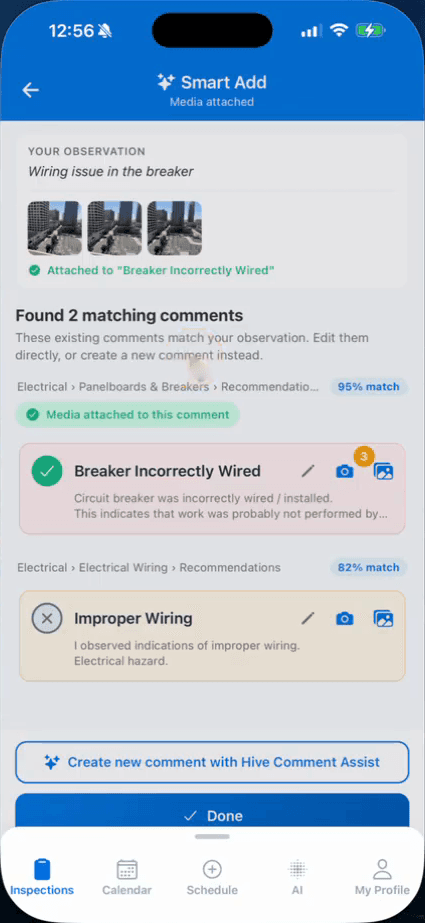
In the mobile app, type a finding or tap the microphone and say it. Smart Add shows up to three of your own comments with a match score. If none fits, it drafts a new one and files it in the right section. It needs a connection. Inspectors report it saves them 25–30 minutes per inspection.AI Comment Assist
Type a few words, such as “leaky faucet under kitchen sink”, pick a length and get a full comment to check. Drafts follow your company writing prompt. It works in the web report editor, the template editor and, through Smart Add, the app. Inspectors report it saves them about 20 minutes per inspection.Photos and video on each finding
Take photos in quick succession with the in-app camera and mark them up with arrows, circles and text. Tag each one with where you found it, such as “master bedroom”. Add video to a comment. Photos, video and storage are unlimited.On site, with or without signal
Write the report in the app on iPhone, iPad or Android. Photos, writing and editing work with no signal, and the report syncs when you’re back online. Prefer a laptop? Open the same report in the web editor.Defects sorted by how serious they are
Each defect gets one of up to three color-coded categories, with names you choose. The report can open with a defect summary, and you decide which categories it shows.A report clients and agents can read
Clients and agents read an online report with photos, video and a search bar, or download the full report and the summary as PDFs. Your logo goes on the report, and your brand color goes on the PDF. Agents can build a repair request from the defects.State forms
Templates for the Texas TREC REI 7-6, Florida wind mitigation and 4-point forms, and the NPMA-33 wood-destroying insect report.Publish from your phone
Publish when you finish, from the app. Hive builds the PDF and sends the report-ready email or text to the client and agent.
Writing a report in Hive, step by step
- 1Bring your template. Upload it from Spectora, HIP, HomeGauge or Horizon, add one from the Template Hub, or ask our team to move it.
- 2On site, open the report in the app, tap Smart Add, then type or say what you found and add photos.
- 3Pick the matching comment from your template, or check the comment AI Comment Assist drafts and add it.
- 4Read the defect summary before you leave, then publish from your phone.
What to check when you compare report software
Four questions to ask any report software before you switch.
Does the AI start from your own comments?
Matching to your library keeps your wording and your liability language. In Hive, Smart Add looks through the comments in your report first and only drafts when nothing fits.Can you finish the report on site?
You write each finding while you stand in front of it, so there’s no desk session rebuilt from memory and photos. Hive’s app runs on iPhone, iPad and Android and keeps working with no signal.Can you bring your templates?
Your template holds years of your own wording. In Hive you upload Spectora, HIP and HomeGauge templates yourself, or our team moves your templates, agreements, contacts and services for free.Is the AI included or extra?
Check whether AI is part of the plan or a paid add-on with a usage limit. In Hive every AI tool is included on every plan, with no per-use fees, for $99/month, plus $69/month for each extra inspector, however many inspections you do.
Limits worth knowing
The AI helps with the words. What you found, how serious it is and what to recommend stay with you.
- Hive’s AI works from what you type or say. It doesn’t look at your photos.
- Smart Add, AI Comment Assist and AI Comment Merge need an internet connection.
- Smart Add is in the mobile app. At the desk, use AI Comment Assist in the web editor.
- Nothing goes into the report until you check it and add it.
- Reports in Spanish or French come as a PDF. The online report stays in English.
Report software questions
Something else? Ask customer support, 7 days a week, by chat, screen share, video call or email.
What is home inspection report writing software?
Can I write the whole report on my phone?
Does Hive’s AI write the report for me?
Can I say a finding instead of typing it?
Can I keep my templates from Spectora, HIP, HomeGauge or Horizon?
How much does Hive’s report writing software cost?
Keep reading
- How inspectors use AI to write reportsWhere AI cuts writing time, and where you stay in charge.
- Better comments, fasterWrite each comment in three parts and lead with a summary.
- Reports from voice notesSay each finding into Smart Add instead of typing it.
- Sample reportsWhat your client sees, online and as a PDF.
Write your next report in Hive
Start with a free trial: 5 free reports, no credit card. We move your templates, agreements, services, contacts and settings, and set up your account so it’s ready to run your business, free.